Curry Restaurant
Diving into LeakCanary
LeakCanary is a widely used library for detecting memory leaks in Android apps.
Adding a dependency is enough to get it running.
dependencies {
  // debugImplementation because LeakCanary should only run in debug builds.
  debugImplementation("com.squareup.leakcanary:leakcanary-android:2.14")
}
Install a debug build on a device and a canary launcher appears next to the app. When a leak is found, LeakCanary reports it with a toast or a notification.
This article is about why that works without any initialization code in the application.
Memory leaks and where watching starts#
A memory leak is an object that should have become collectable, but stays reachable through a reference chain and therefore never becomes GC-eligible. In View-based Android apps, Activity instances — with a lifecycle tied to a screen — are a typical target.
Leak detection needs a way to know when a component is destroyed. Activity already exposes lifecycle observation as a public API, so the source should contain a registration such as Application.registerActivityLifecycleCallbacks.
Searching the LeakCanary repository with ripgrep turns up exactly that path.
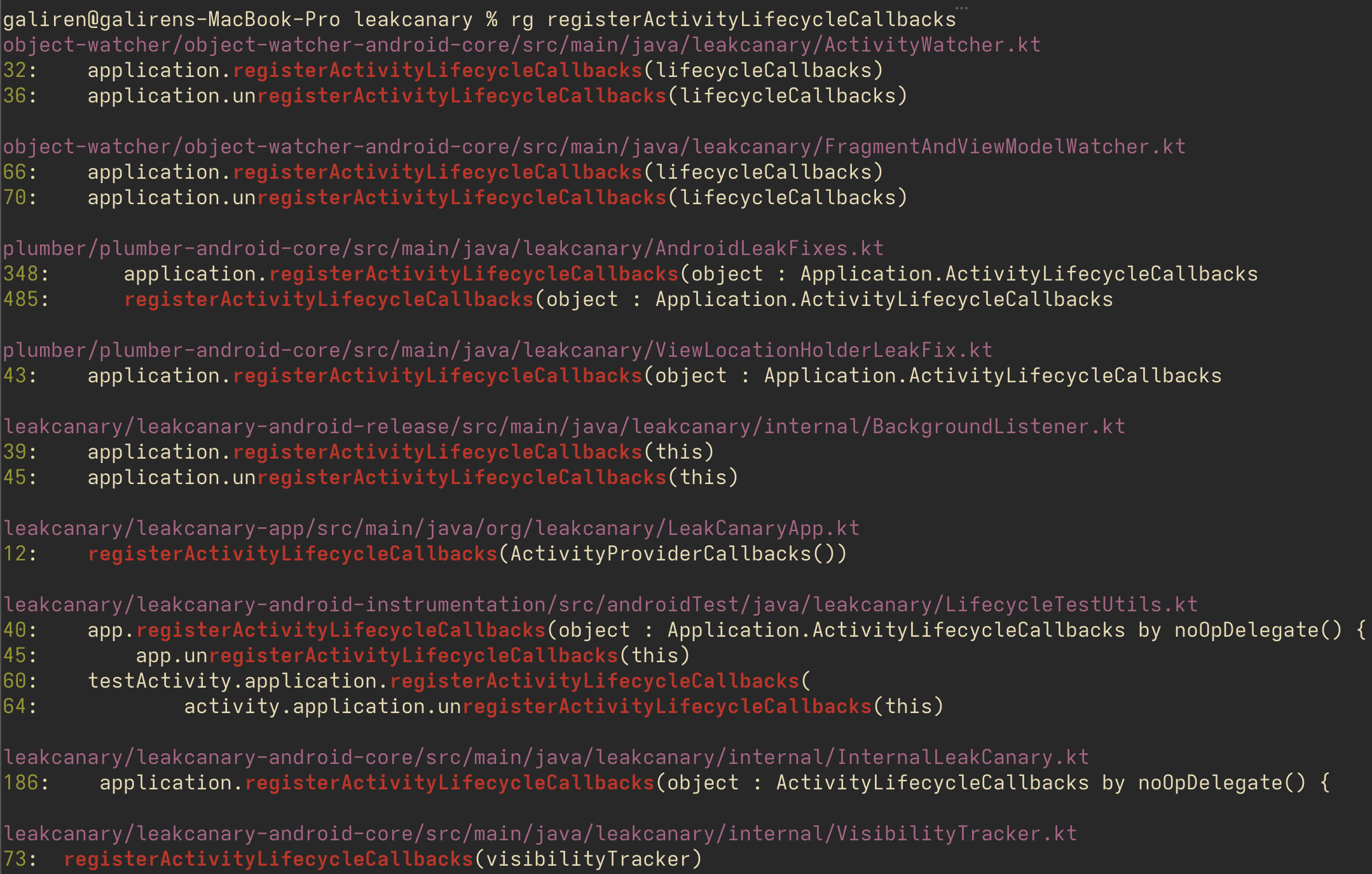
ActivityWatcher and FragmentAndViewModelWatcher are the central watching implementations. Following the call graph, the flow looks roughly like this.
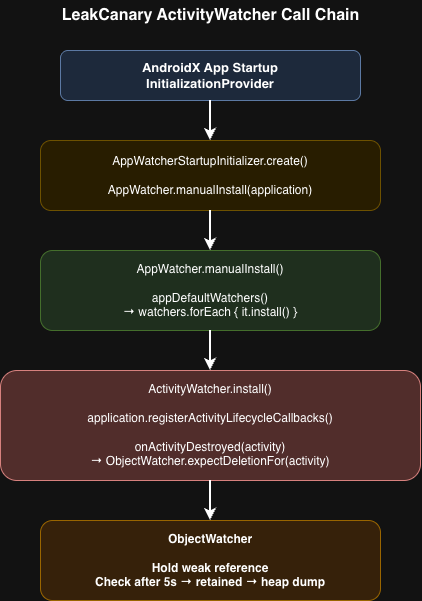
Watching itself is AppWatcher plus the individual watchers. The remaining question is when, and by whose hand, those watchers are installed.
The classic auto-install: ContentProvider#
On Android, ContentProvider onCreate runs at process start, before Application.onCreate. A library author can declare a ContentProvider in the library AndroidManifest.xml, merge it into the host app via the merged manifest, and initialize without borrowing a single line from the app.
The object-watcher artifact that standard leakcanary-android depends on registers an installer in the manifest (in current source, MainProcessAppWatcherInstaller):
<provider
    android:name="leakcanary.internal.MainProcessAppWatcherInstaller"
    android:authorities="${applicationId}.leakcanary-installer"
    android:enabled="@bool/leak_canary_watcher_auto_install"
    android:exported="false" />
The implementation is an install-only provider: no CRUD. onCreate takes the Application and calls AppWatcher.manualInstall.
internal class MainProcessAppWatcherInstaller : ContentProvider() {

  override fun onCreate(): Boolean {
    val application = context!!.applicationContext as Application
    AppWatcher.manualInstall(application)
    return true
  }

  // query / insert / update / delete are unused
}
manualInstall then registers the default watchers (Activity, Fragment, and so on), and leak watching starts. The “add a debugImplementation and the canary appears” experience is this manifest merge plus ContentProvider startup order.
Auto-init via ContentProvider has also been used by Firebase and older WorkManager. The known cost is that each library adds another provider, and those add up at process start.
AndroidX App Startup and LeakCanary#
Google introduced AndroidX App Startup. Instead of each library shipping its own ContentProvider, they share a single InitializationProvider and list Initializer implementations under <meta-data>. At startup, App Startup resolves dependencies and calls Initializer.create.
Since the 2.8 line, LeakCanary offers this path as an option. Replace the usual leakcanary-android with leakcanary-android-startup.
dependencies {
  // debugImplementation("com.squareup.leakcanary:leakcanary-android:2.14")
  debugImplementation("com.squareup.leakcanary:leakcanary-android-startup:2.14")
}
The startup module merges an App Startup manifest entry instead of its own ContentProvider. The object-watcher side looks like this:
<provider
    android:name="androidx.startup.InitializationProvider"
    android:authorities="${applicationId}.androidx-startup"
    android:exported="false"
    tools:node="merge">

  <meta-data
      android:name="leakcanary.AppWatcherStartupInitializer"
      android:value="androidx.startup" />
</provider>
The matching Initializer is again a thin wrapper around AppWatcher.manualInstall.
class AppWatcherStartupInitializer : Initializer<AppWatcherStartupInitializer> {
  override fun create(context: Context) = apply {
    val application = context.applicationContext as Application
    AppWatcher.manualInstall(application)
  }

  override fun dependencies() = emptyList<Class<out Initializer<*>>>()
}
As the changelog lays out, leakcanary-android is a thin entry that carries auto-install code; the core lives in leakcanary-android-core. Depending on core directly and calling AppWatcher.manualInstall yourself is a way to skip auto-install. object-watcher and plumber follow the same split: *-core / default (ContentProvider) / *-startup.
| Path | Typical dependency | Startup hook |
|---|---|---|
| Default auto-install | leakcanary-android | Library-owned ContentProvider |
| App Startup | leakcanary-android-startup | Shared InitializationProvider + Initializer |
| Manual | leakcanary-android-core | manualInstall from the app Application.onCreate |
If the app already gathers other libraries under App Startup, switching LeakCanary to the startup artifact keeps auto-install without adding another ContentProvider. When init timing and order need to be strict, turn auto-install off and call manualInstall.
A note on how this path showed up#
This path appeared by following two public entry points: the Activity lifecycle API, and manifest / process startup order. Picking up names with a search tool (grep / ripgrep) and then chasing references in the IDE still works, with or without AI assistance.
Much of the “add a dependency and it just works” experience is not runtime magic. It rides on platform rules: manifest merge and component startup order. The move from ContentProvider to App Startup is the same contract, with a different way of gathering initialization.